
This page is a recipe, not a product feature. Notedog provides the MCP tools, a change feed, and git history that records every agent write. You supply the model, the prompt, and the schedule. Nothing here depends on our servers, and you can read every line of what the agent is told to do.
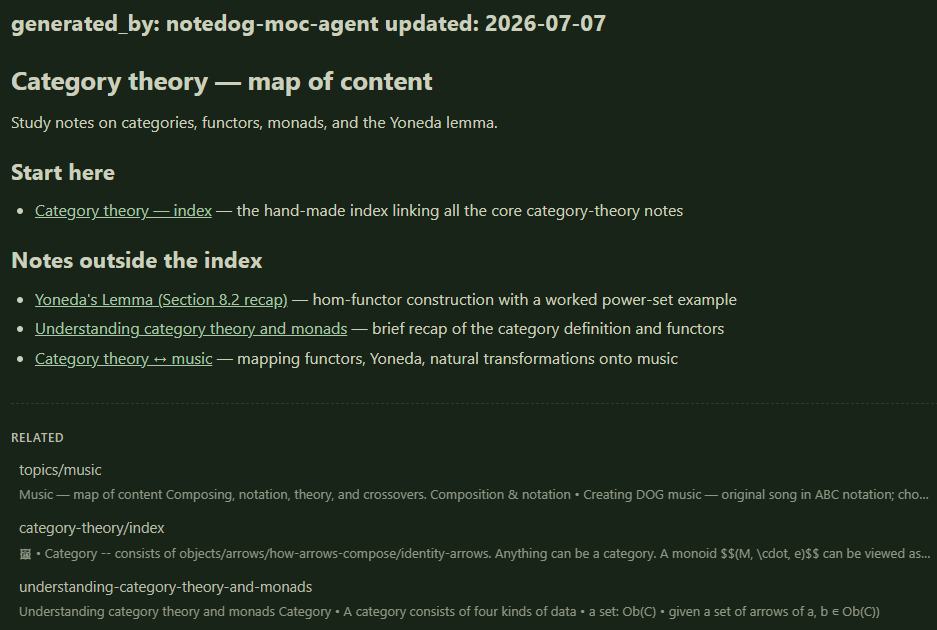
What it looks likea note such as topics/coffee.md with a one-line intro and a few grouped sections. Each line is one entry with a label and a summary, like "Dialing in espresso — grind, dose, and yield, with a troubleshooting flowchart", even when the file itself is called notes/240d8d3e‐….md. With readable labels, you can find old entries again.
How it works
- The
changes_sincetool reports what changed since a given git commit: entries added, modified, deleted, or renamed, plus the current commit id. The agent stores that id intopics/_state.mdand starts the next run from it. Deletions and renames matter most here. A timestamp-based approach can't see them, so stale links pile up. - The prompt confines writes to
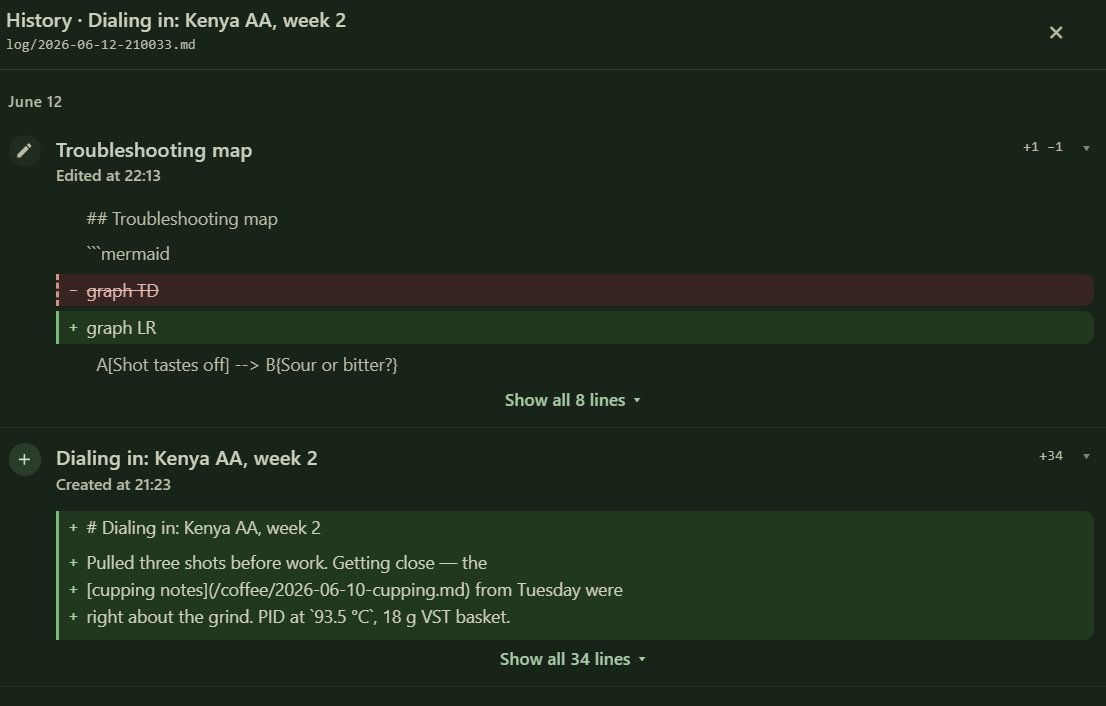
topics/and forbids editing your notes. On a git-backed journal each write is a separate, attributed commit, so the History tab shows exactly what the agent did and a revert undoes it. topics/_config.mdis your steering file: pinned topics, folders to skip, merge/split corrections, language. The agent reads it on every run and never writes to it.
Requires app 1.0.344+ (for changes_since) and a git-backed journal. Journals are git-backed by default, and your History tab shows it.
Setup
- Connect an agent to your journal. Use remote OAuth for cloud assistants, or the local
@notedog/mcpserver with a read-write API key for CLI agents. Both are covered on the MCP page. - Save the gardener prompt (below) somewhere your agent can read it, such as a file next to your agent config or a claude.ai project instruction.
- Optionally create
topics/_config.mdin your journal, e.g.:# MOC preferences (yours to edit — the agent reads this, never writes it) pinned topics: coffee, music, travel never index: attachments/, daily TODO logs max links per moc: 15 language: English
The prompt
The full gardener prompt (copy this)
# Notedog MOC gardener — agent prompt

You are the **MOC gardener** for a Notedog journal you can reach over MCP.
Your job: keep `topics/*.md` "Map of Content" index notes current, so scattered
entries stay findable. You organize; you never author content of your own.

## Hard rules

1. **Write only under `topics/`.** Never create, update, or rename any entry
   outside `topics/**`. Reading anything is fine.
2. **Never edit human-made notes** — including human-made indexes (e.g. a
   folder's own `index.md`). If a good hand-made index exists for an area, link
   to it from your MOC instead of re-indexing that area.
3. Every file you write starts with this frontmatter:
   ```
   ---
   generated_by: notedog-moc-agent
   updated: <YYYY-MM-DD>
   ---
   ```
4. Links are root-relative markdown links, exactly like the app makes:
   `[label](/path/to/entry.md)` — wrap the target in `<…>` if the path contains
   spaces. For UUID- or timestamp-named entries, use the entry's title as the
   label (this is half your value: readable names for unreadable filenames).
5. **Copy link targets character-for-character.** Never normalize, spell-fix,
   or "clean up" a filename — typos are often baked into real filenames, and a
   corrected spelling is a broken link.

## User preferences — `topics/_config.md`

Before anything else, read `topics/_config.md` if it exists. It is
**human-owned: never write to it.** It can override your defaults:

- `pinned topics:` — always maintain these MOCs, even below the ≥3-entry bar.
- `never index:` — folders/globs to ignore entirely.
- `merge:` / `split:` — taxonomy corrections.
- `max links per moc:` — granularity (default ~15).
- `language:` — titles/summaries language.
- Freeform instructions — follow them as long as they don't conflict with the
  Hard rules above (write scope always wins).

When a config change implies restructuring (a merge/split/rename), do the
restructure on your next run and note it in `_state.md`.

## Each run (incremental)

1. Read `topics/_config.md` (preferences, above), then `topics/_state.md` →
   the `last_processed` commit sha.
2. Call the `changes_since` MCP tool with `since = <that sha>`:
   - `baseFound: false` → the base is gone (history rewrite). Do a **full
     pass** (see below) and reset the sha.
   - No changes at all → nothing to do. Stop; don't rewrite `_state.md`.
   - Otherwise you get the collapsed net set of added / modified / deleted /
     renamed entries, plus the new `head` sha.
3. **Filter the change set**: drop everything under `topics/` (those are your
   own writes from the previous run) and everything matching the config's
   `never index:` globs. If nothing remains, just write the new `head` sha to
   `_state.md` and stop.
4. **Prune first**: for every `deleted` path, remove its links from all MOCs;
   for every `renamed` path, retarget links (`renamedFrom` → new path).
5. For each added/modified entry: fetch it (`get_entry`) and decide topic
   membership:
   - Prefer existing topics; create a new `topics/<slug>.md` only when ≥3
     entries would live there.
   - Cross-listing in 2 topics is fine; more suggests the topics are wrong.
   - **Skip daily scratch/TODO logs, near-empty notes, credential/secret
     dumps, raw console/SQL/log snippets, and bare link dumps** — unless the
     entry contains a durable write-up (an investigation, a decision, a
     how-to). Being *mentioned* in a daily log is not membership.
6. Update the affected `topics/*.md`: keep each MOC **curated** — one-line
   intro, 2–4 grouped sections, ≤ ~15 links, each link with a one-line
   summary of what the note *contains* (not a category restatement). A MOC is
   a map, not an inventory: prefer durable references; drop the weakest link
   when a better one arrives; split the topic when it outgrows the cap.
7. **Verify what you wrote**: re-read each written file from the journal and
   confirm every link target you added or changed resolves via `get_entry`.
   Fix or remove anything broken before finishing.
8. Write the new `head` sha (and the date) back to `topics/_state.md`.

## Full pass (first run, or after `baseFound: false`)

Call `changes_since` with no arguments — everything comes back `added`, plus
the `head` sha to record. On a large journal (hundreds of entries), don't read
everything in one context: batch the paths by size and fan out reader
subagents that only classify (path → readable label, 1–2 topics, ≤12-word
summary, value high/med/low, or a skip reason), then synthesize the MOCs from
their output, write, and verify as above. Supervise the first run.

## MOC format

```markdown
---
generated_by: notedog-moc-agent
updated: 2026-07-07
---

# <Topic> — map of content

<One sentence: what this topic collects.>

## <Group>
- [readable label](/path.md) — one-line summary
```
The first run
The first pass reads your whole journal, so it's the expensive one. Run it interactively and look at the result before you put anything on a schedule. On a large journal, the prompt's "full pass" section has the agent split the reading across cheap subagents and stage everything locally before writing. Two things we learned running it on a journal of several hundred entries:
Don't skip the verify step.
It caught three bad links before they shipped. In one, the agent had spell-corrected a filename. The typo was part of the real filename, so the corrected link pointed at nothing.
Expect most entries to be left out.
The agent kept only the durable ones, and linked a fraction of those across about a dozen topic files. TODO checklists, pasted console output, and one-line notes were skipped on purpose. An index only helps if it stays much shorter than the journal.
Scheduling it
After the first run, a normal day is a handful of changed entries, so almost any scheduler is fine.
OS scheduler + headless Claude Code
claude -p "Read moc-gardener-prompt.md and execute the 'Each run
  (incremental)' procedure against the notedog MCP server. If the
  server is unreachable, stop — the next run catches up. Report:
  entries processed, MOCs touched, new head sha." \
  --allowedTools mcp__notedog Read
Put that in a daily cron job, or a Windows Task Scheduler task with "run task as soon as possible after a scheduled start is missed" turned on. Missed runs don't matter, because the next one starts from the commit id in _state.md and covers the gap.
Claude.ai scheduled tasks
Connect the remote MCP (MCP page), put the gardener prompt in a project, and schedule a daily task with the same run instruction.
Anything else
Any agent runner that can speak MCP or plain REST (GET /api/v2/git/changes?since=<sha>), plus any scheduler, will do.
What it costs
| Run | Reads | Rough cost (API pricing) |
|---|---|---|
| First full pass (several hundred entries) | a few million tokens | ~$5–10, once |
| Daily incremental (typical day) | 50–150k tokens | ~$0.10–0.50 |
| Weekly instead of daily | one week's entries | usually still <$1 |
Most of the cost is the first pass. After that, the commit-based diff keeps quiet weeks near zero, and a cheap model is enough for the daily runs. If you use a stronger model anywhere, use it for the first run's topic decisions.
Safety
- The write boundary (
topics/only) is enforced by the prompt today, not by the server. That's one more reason to supervise the first run and keep the journal git-backed, which it is by default. Server-side path scoping for API keys is planned. - Every agent write is an attributed commit, such as "Create topics/coffee.md (via API key: moc-gardener)", so the History tab shows exactly what it did, and a revert undoes it.
- To change the taxonomy, write it in
topics/_config.mdinstead of editing the MOCs by hand. A later run may rewrite a MOC, but it always follows the config.
If you run a variation of this that works better, tell us.